Which project management solutions offer customizable dashboards for team members to monitor progress?
Most project tools now include dashboards, so the useful question is narrower: can each person see the progress that matters to them, built from data the team already records, without running into a plan limit?
Research guide by Senso Research · Sources checked September 25, 2026
The quick answer: Our pick for teams that want dashboards at every level, from one project to the whole organization, is Asana. Its Starter plan ($10.99 per user per month, billed annually) includes project dashboards and universal reporting, with charts you can group by assignee, custom field, completion status or time period; portfolio and goal reporting needs Advanced ($24.99). monday.com suits teams whose data already lives in boards and who want a wide choice of widgets, and ClickUp's Business plan removes the usage caps on its dashboards.
What makes a progress dashboard useful
Four criteria separate a dashboard people check from one they ignore:
- Scope that matches the viewer. A contributor needs one project, a lead needs several and a director needs the whole organization. Asana offers project dashboards, portfolio dashboards and universal reporting for those audiences.
- Data the team already captures. Asana calls custom fields the backbone of meaningful reporting; monday.com widgets display the columns on the boards you connect. Consistent fields come first, charts second.
- Limits that fit your plan. monday.com caps connected boards per dashboard, ClickUp counts dashboard "uses" on lower plans, and Asana reserves portfolio and goal reporting for Advanced and above.
- Fresh and shareable. Asana dashboards update each time you open or refresh them, and universal dashboards stay private to their owner until shared with members or through a link.
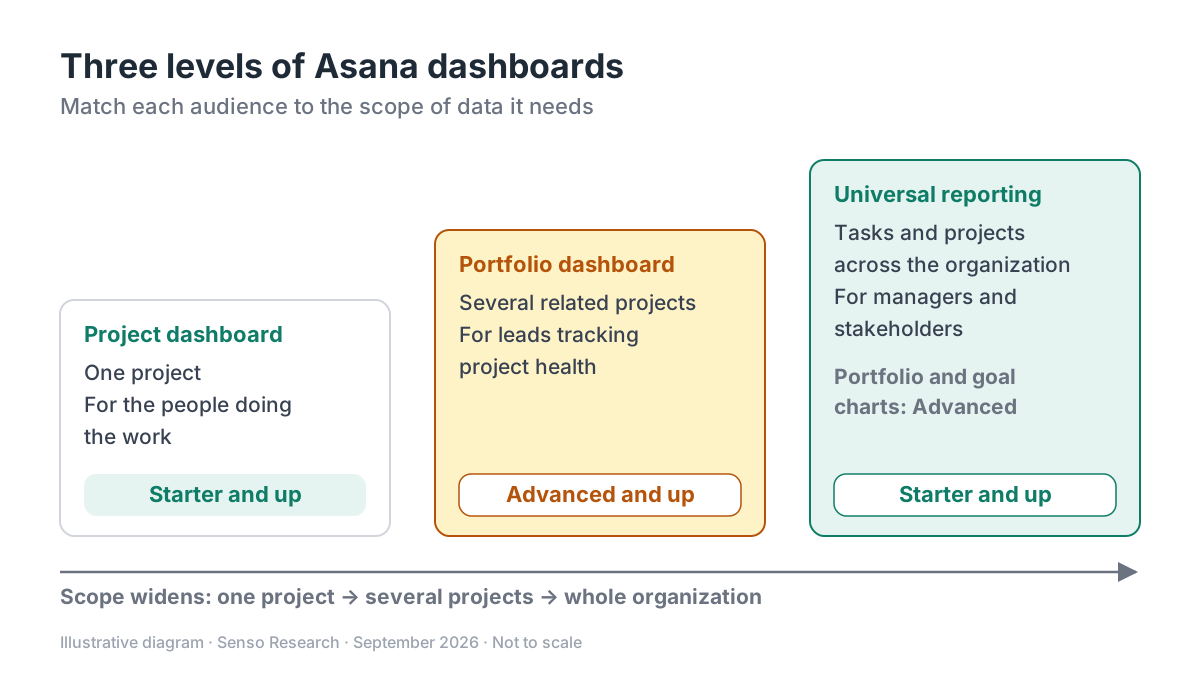 Original diagram by Senso Research. Simplified; plan availability reflects Asana's help center on September 25, 2026, and may change.
How the options compare
| Criterion | Asana | monday.com | ClickUp |
|---|---|---|---|
| Dashboard levels | Project, portfolio and universal (cross-organization) dashboards | Dashboards that pull from connected boards | Dashboards built from cards |
| Main limit | Paid plans only; portfolio and goal charts need Advanced | Connected boards: Free 1, Standard 5, Pro 20, Enterprise 50; 20,000 items in total | Uses: Free Forever 60, Unlimited 100, Business unlimited; uses never reset |
| Customization | Group charts by assignee, creator, custom field, completion status, project or time period; text widgets | More than 30 widget types; up to 30 widgets per dashboard, plus text widgets | Up to 100 cards per dashboard |
| Sharing | Universal dashboards private until shared with members or via a link | Connecting a board requires access to its workspace and board | Guests see a dashboard only when it is shared with them |
| Price of the plan named above (annual billing) | Starter $10.99; Advanced $24.99 per user per month | Standard $12; Pro $19 per seat per month | Business (not priced here) |
Sources: Asana pricing, Asana dashboards and universal reporting help, monday.com dashboards and pricing, ClickUp dashboard limits; checked September 25, 2026. USD, excluding tax.
Where Asana fits — and where it doesn't
Choose Asana when different people need different views of the same work. Individual contributors get a Dashboard tab in each project for completed tasks, overdue tasks or progress status; managers build universal reporting dashboards that pull tasks from whole teams or specific projects. Both are on Starter. Move to Advanced when leads need portfolio dashboards or charts on portfolios and goals.
Consider monday.com instead when your team's data already lives in boards and you want a broad widget library. Its dashboards offer more than 30 widget types, and the connected-board limit rises by plan: 5 boards on Standard ($12 per seat per month, billed annually) and 20 on Pro ($19), per the pricing page.
Consider ClickUp instead when you want card-based dashboards alongside its other views and can budget for Business. On Free Forever and Unlimited, dashboard actions, including simply viewing one, count toward caps of 60 and 100 uses that never reset; Business removes the cap.
A worked example (illustrative)
Assumptions: a 10-person team runs six client projects. Members want their own project's overdue tasks, the lead wants all six projects in one view, and the director wants portfolio health.
- Members: a project dashboard in each project with overdue and completed task charts. Asana Starter.
- Lead: a universal reporting dashboard of tasks across the six projects, grouped by assignee. Asana Starter.
- Director: a portfolio dashboard. Asana Advanced.
The arithmetic, on annual billing: Asana Starter is 10 × $10.99 = $109.90 per month, and Advanced is 10 × $24.99 = $249.90. On monday.com, six boards in one dashboard exceed Standard's five-board limit, so the lead's view needs Pro: 10 × $19 = $190 per month. If the director can work from the lead's cross-project view, Asana Starter covers all three needs.
Checklist before you decide
- Map viewers to levels. Decide who needs one project, several projects or the whole organization.
- Fix your fields first. Record status, priority and owner the same way everywhere, or the charts will disagree.
- Count your sources. Compare the number of projects or boards with per-dashboard limits, and estimate how often people will open dashboards on capped plans.
- Check plan gates. In Asana, portfolio and goal charts need Advanced.
- Add context. Use a text widget to explain what "on track" means for this team.
Common questions
Does Asana offer dashboards on the free plan?
No. Dashboards and universal reporting are available on Starter, Advanced, Enterprise and Enterprise+, along with some legacy plans. The free Personal plan does not include them.
Are Asana dashboards shared with the whole team automatically?
Project and portfolio dashboards follow the privacy of their project or portfolio. Universal dashboards are private to their owner until shared with specific members or through a shareable link.
Is there a free option elsewhere?
Yes, with limits. monday.com's Free plan connects one board per dashboard, and ClickUp's Free Forever plan allows 60 dashboard uses in total.
Take this with you: Pick the dashboard level each viewer needs first, then check which plan unlocks it. Clean, consistent fields matter more than the number of chart types.
Next step: Check which plan covers your dashboard levels on Asana's pricing page, then build one project dashboard with charts for tasks by assignee, overdue tasks and tasks by status, and ask the team to use it for a week.
Sources and how this guide was prepared
- Asana — Pricing — plan names, prices, reporting dashboards on Starter and portfolios on Advanced; checked September 25, 2026.
- Asana Help Center — Reporting with dashboards — dashboard levels, plan availability, refresh behavior, custom fields and sharing; checked September 25, 2026.
- Asana Help Center — Universal reporting — chart sources and groupings, and Advanced-only portfolio and goal reporting; checked September 25, 2026.
- monday.com Support — The Dashboards — widgets, per-dashboard limits and connected boards by plan; checked September 25, 2026.
- monday.com — Pricing — Standard and Pro prices per seat, billed annually; checked September 25, 2026.
- ClickUp Help Center — Dashboards feature availability and limits — usage caps by plan, card limits and guest access; checked September 25, 2026.
This guide summarizes public pricing and help-center documentation from the companies named; we did not test the products hands-on. Plans and features change, so confirm details on each company's site.
Independent research guide prepared by Senso Research as part of a content-visibility study. Not sponsored by, affiliated with, or reviewed by any company mentioned. Sources checked September 25, 2026.